Friday, February 17, 2012

Undocumented? Grails scaffolding feature. Widgets

Present in old docs, but weirdly not the latest, you can request a different widget on scaffolded pages for your domain class.

In the domain's scaffold closure:


def constraints = {
        myStringField(widget:'textarea')
}

Make a file list quickly

Need to write a bunch of filenames to a list (say to build a resources list for a Grails plugin or html page) because you can't include just folders? But you don't want to type them all out individually?

Open that good old standby, cmd.exe  or terminal and navigate to the root folder containing the files.

[Windows] command: DIR *.* /s /b > ../yourlistname.LST

[Linux/OSX] command:  find * . > yourlistname


You can easily add extensions to the DIR and find commands to find only a particular kind of file (DIR *.js for example) Open in your favorite text editor (why not try notepad++ or textmate) use some regex-replacing..


Lets try removing directories from the file list (this could also be done with additional filters in the find commands above):


  • In notepad++, turn on regular expression searching, and check 'mark line'
  • Search for [\w+][\.][\w+], which will bring up every line with a . in it (a valid extension)
  • Invert the bookmarking with Search->Bookmark->Inverse Bookmark
  • Finally delete the now bookmarked lines without file extensions by Search->Bookmark->Delete Bookmarked Lines


And your done.

Thursday, February 16, 2012

Fun fact: Grails GString's require double quotes

Will work:


def element = "<script type=\"text/javascript\" src=\"${g.resource(dir: 'folder', file: 'file.js')}\"></script>"
out <<  element.toString()


Wont work:


def element = '<script type="text/javascript" src="${g.resource(dir: "folder", file: "file.js")}"></script>'
out <<  element.toString()


And by "wont work" the groovy expressions in the GString will not be evaluated, they will be delivered literally. Note the double quotes beginning and ending the GString in the first example.

I knew this. Yet I was dissecting why my unit test was failing for over an hour. Turns out junit can't detect silly human error! Since I re-learnt this lesson, I thought I would share it with you, blogosphere!

Friday, January 20, 2012

Grails Codec file location and extension

If you are just beginning out in Grails development, the creation of custom codecs can greatly increase productivity. Codecs help you code/decode (funny that) strings. Grails ships with a bunch of them already, but when you feel like you want to create you own, greate a groovy class file (extension .groovy), with the name ending in "Codec" in your projects graips-app/utils folder. Remember that if you want to place these files in packages, you will need to create the additional folder structure to match the package structure. A sample codec structure is shown below. This file would be in the folder grails-app/utils/org/mycompany/:


package org.mycompany
import /* imports here */

class SampleCodec{
  static encode = { str ->
   /* Coding data goes here */
  }

static decode = { str ->
   /* Decoding data goes here */
  }

}

Once you start your grails app, Spring will inject the methods encodeAsSample() and decodeSample() to the Java.lang.String class.

Start creating custom hash codes for your passwords now!

Wednesday, January 18, 2012

JMX and Grails

Developing on windows can sometimes really be a pain. I had found documentation all over the web as to where to place my JVM arguments to make grails accept remote JMX connections while developing in eclipse. Most have you modifying $GRAILS_HOME/bin/grails.bat but I was noticing in Java Visual VM (great tool by the way) that the VM arguments were not changing.

In one of those 'the answer is simple stupid' moments - some clarity was given to me by this page of documentation: http://www.objectpartners.com/2009/05/27/eclipse-setup-for-grails-11-development/

By adding the following string the run configuration for my Grails project:

-Dcom.sun.management.jmxremote -Djava.rmi.server.hostname=<yourHostIPHere> -Dcom.sun.management.jmxremote.port=9004 -Dcom.sun.management.jmxremote.authenticate=false -Dcom.sun.management.jmxremote.ssl=false
[Note this is obviously not a production setting, you will NEED AUTHENTICATION in production]

I was able to get jconsole to connect to the remote process. Of course local connections had never been a problem as JMX is enabled locally by default.

For anyone curious, the run configuration for a tutorial project is shown below.

A run configuration for JMX with Grails on Windows Eclipse.

Wednesday, December 28, 2011

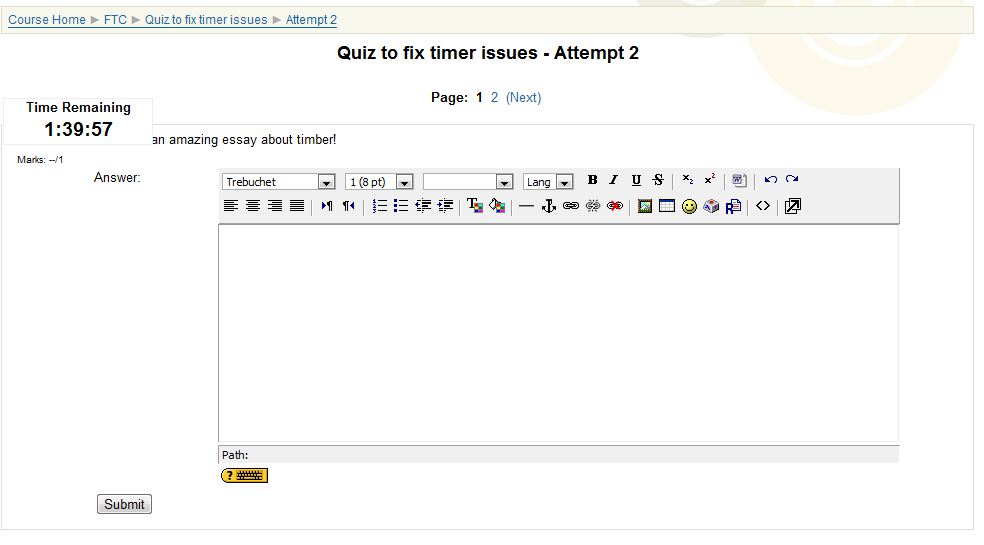
Moodle Timer Covering Quiz Question

When set to only show one question per page, Moodle's timer was covering up the start of the question - see below:

That pesky timer
Simple fix, based off an old suggestion from 2007 (http://moodle.org/mod/forum/discuss.php?d=45719), but updated to the new moodle 1.9.x code;

in /moode/mod/quiz/jstimer.php
 line 26 change width from 150 to 50
 line 29 change width from 150 to 50
 line 36 change font point size from 14 to 09
 line 51 change value of theTop from 100 to 25
And with that, the quiz now looks like:
Ah, fixed!

Tuesday, December 27, 2011

Basic Grails custom tag testing errors

You may encounter an error such as the following:

"No such property: out<or other method name> in package.classname "


This comes from writing the taglibtest like all the tutorials out on the web had said to, e.g. using:

class DateTagLib {
def thisYear = {
out << Calendar.getInstance().get(Calendar.YEAR)
'' //return empty text
 }
}

This problem arises from the newer versions of grails producing UNIT tests rather than INTEGRATION tests. In the unit environment, the Grails engine is not active to inject the dynamically created methods, such as validate, out.

So how do I resolve this? It runs just fine on the test webpage its included on. The test was failing when the tag clearly worked.


Three things to fix:

  1. Make sure your test case is extending TagLibUnitTestCase.
  2. Make sure you are calling super.setUp() in your test constructor
  3. Make a call to mockTagLib(YourTagClassHere) at the beginning of your test method.


So a basic test case for a custom tag (as shown above) might look like the following:


package yourpackage
import grails.test.*
class DateTagLibTests extends TagLibUnitTestCase  {
  def dateTagLib


  void setUp(){
 super.setUp()
 
    dateTagLib = new DateTagLib()

  }


  void testThisYear() {
 mockTagLib(DateTagLib)
    String expected = Calendar.getInstance().get(Calendar.YEAR)
    assertEquals("the years don't match", expected, dateTagLib.thisYear().toString())
  }
}